The improvements suggested by David offer an improvement for holding together the LEDs in the grid. In the present grid, which simply offers a hole for the LEDs to fit into, the leads are able to rotate, making the design much more of a pain to solder together. His solution is simple, redesign the left row on the soldering guide to offer grooves similar to the bending guide to hold everything down in place. As seen in the photo on the right, our 4x4 grid was cut to a 2x4 grid to help get more people working at the same time. However, the drawings that he offered me for redesign we well laid out and offer up this new idea in return: provide grooves for the LED leads to keep them from rotating around too much, and provide cut holes for open areas so that we can solder the leads together. It was a simple improvement, he put in a lot of work on this, and the design change is exactly the kind of feedback I want to hear about my designs.
Monday, November 14, 2011
Design Changes and Milestones
The improvements suggested by David offer an improvement for holding together the LEDs in the grid. In the present grid, which simply offers a hole for the LEDs to fit into, the leads are able to rotate, making the design much more of a pain to solder together. His solution is simple, redesign the left row on the soldering guide to offer grooves similar to the bending guide to hold everything down in place. As seen in the photo on the right, our 4x4 grid was cut to a 2x4 grid to help get more people working at the same time. However, the drawings that he offered me for redesign we well laid out and offer up this new idea in return: provide grooves for the LED leads to keep them from rotating around too much, and provide cut holes for open areas so that we can solder the leads together. It was a simple improvement, he put in a lot of work on this, and the design change is exactly the kind of feedback I want to hear about my designs.
Tuesday, November 8, 2011
More Squares!
| PCB minus 3 signals |
| 16 X 8 panel. |
Kinect on PC
So I got the Kinect to display and track people on the monitor of a PC. Unfortunately, that wasn't my intent. What I was trying to do was to link the Kinect to my own personal computer. For some reason I was missing the mscvp100.dll file on my laptop, which didn't allow the video to show up. I'm currently working to fix the problem so that I may take my programming wherever, but for now I'll be working at UAT's Robolab.
Monday, October 31, 2011
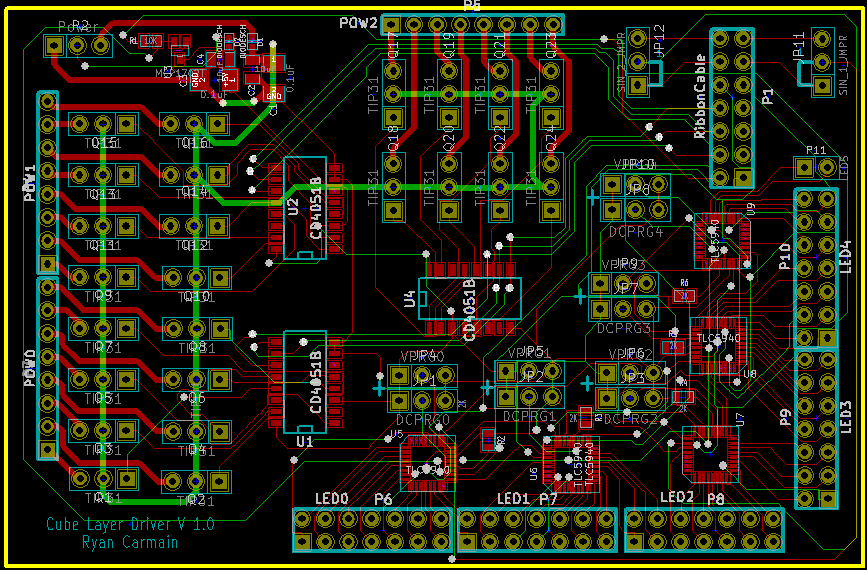
PCB Work
| Current state. |
In addition to progress work on the PCB, it appears like the direct port writing for the software is working just fine. In dealing with software, I need to put some more time into figuring out the timers to correctly change states on the PIC on the chipKIT.
Wednesday, October 26, 2011
Building the Cube
Just like mentioned in the previous post, the construction of the LED cube has commenced. In 2.5 hours, we were able to solder the multi-colored LEDs in an 8 x 8 grid.

By using our bending jigs, we are able to bend the leads on the LED diodes to separate the 3 color channels from the GND (ground). The easiest way we figured for soldering the LED was with the use of a grid that we also printed in 3D as shown on the picture below.

The grid is designed to fit our LEDs with 5/8 in. distance between them. Because the size of our LED panel will be huge, we only fit up to 8 LEDs in our grid mold to easily solder small lines or squares. Once we have enough to build a 4 x 4 grid, we test them to reassure our solder was correct and no leads touch each other. Once tested we built the 8 x 8 grid and tested it again. Thankfully, we had no problems with our first grid. Several students in the Robotics Department have agreed to assist us, but to ensure nice looking, well soldered panels, Ryan and I train the students so each panel will be identical to each other.
We are still soldering the LEDs and will be posting up more pics on its build.
Tuesday, October 25, 2011
Progress!
This last weekend we soldered together a simple little 8 X 8 grid of LEDs. This took 2-3 people, while soldering it together and checking it over, about 2.5 hours to do. This can give us a great baseline for about how long it should take us to assemble the cube. Basically, about half an hour to forty-five minutes per 4 X 4 square, including checking it over for any problem connections. Assuming that we can take the same times to produce the other 8 remaining 8 X 8 cube segments, we could be done with soldering this term's goal of a single panel in about 20 more hours. I feel like the guides printed out helped to smooth assembly along greatly, and ensure that each LED is consistent with every other one.
The above LEDs are set at 5/8" intervals, meaning that also the space between panels will need to be about 5/8". This spacing can give us an estimate that the cube of LEDs, not accounting for any of the controlling wires, will be about 15 inches on a side. Once concern with the smaller spacing is that the PCBs that I am trying to design need to be less than 5/8ths inch tall, or there will be some interference between layers. My biggest concern height-wise is the TIP31As, as these are through-hole transistors. Everything else should be fine at its current height.
Wednesday, October 19, 2011
Initial Troubles
So, I've been trying to program with openFrameworks, but before I was able to compile anything, I am greeted with an error message about missing libraries.
If you are using a Window's computer, make sure when you download Code::Blocks you choose the second download link (codeblocks-10.05mingw-setup.exe). This makes sure you download mingw along with Code::Blocks. For some reason the minimalist development environment was not properly installed on my PC. I found an easy to use installer for those who decided to not get the Code::Blocks installer with mingw.
After properly installing mingw, I was able to write simple C++ codes with no problem.
C++
As mentioned in a previous post, openFrameworks is written in the C++ programming language. Even if you are not fluent in C++, there are several resources online for free. If you follow the setup instructions in openframeworks.cc, you'll find that they recommend installing Code::Blocks.
Code::Blocks is a cross-platform IDE (integrated development environment) that supports GCC and MSVC. User friendly, the software is easy to use and allows development for DirectX, OpenGL, and MATLAB on your Windows, Mac, or Linux PC. You may start playing with openFrameworks by following this link and follow this guide to set up your IDE.
As mentioned before, there are several resources online for C++ tutorials.
Monday, October 17, 2011
Cube Project Work
This last week has been overall an interesting week. It started off early on dealing with the bending guide prints. I originally had the bending guide print out at 10 times the size it needed because the export changed my dimensions from millimeters to centimeters. After this save option was found and changed, there were a few more iterations made on the bending guides to refine the size and ensure that the LEDs fit nicely and bend accurately.
After I got the final guide done and the prints, I began to work with the code. I struggled for a day or two with trying to figure why the schematic I had worked out correctly was not operating correctly. I did a lot of digging through the datasheets, and spent a lot of time confused as to why the signals that I thought should be operating at 5V were getting like 3.24 V. I then got an idea, borrowed someone else's chipKIT to confirm the idea, and perused the chipKIT user guides to confirm this idea. It turns out that the chipKIT operates at a 3.3V logic level, and I was expecting a 5V logic level. When providing 5V to Vcc on the TLC5940 PWM drivers, the chip then expects 0.8Vcc, or 4V, to be a high signal. Why this worked in the first video and not now I am still unsure about, but when the logic was changed around to 3.3V as opposed to 5V on Vcc, the chip worked again.
The only other problem that I am having right now, probably because of the way I am running the code right now, the LEDs are visibly flashing. It's obvious that right now the software is still too slow, so my next step with the software, after I finalize the schematics over the next few days, is to implement the interrupts and times so that data is bit banged out and the PWM cycles as fast as I think it can.
After I got the final guide done and the prints, I began to work with the code. I struggled for a day or two with trying to figure why the schematic I had worked out correctly was not operating correctly. I did a lot of digging through the datasheets, and spent a lot of time confused as to why the signals that I thought should be operating at 5V were getting like 3.24 V. I then got an idea, borrowed someone else's chipKIT to confirm the idea, and perused the chipKIT user guides to confirm this idea. It turns out that the chipKIT operates at a 3.3V logic level, and I was expecting a 5V logic level. When providing 5V to Vcc on the TLC5940 PWM drivers, the chip then expects 0.8Vcc, or 4V, to be a high signal. Why this worked in the first video and not now I am still unsure about, but when the logic was changed around to 3.3V as opposed to 5V on Vcc, the chip worked again.
The only other problem that I am having right now, probably because of the way I am running the code right now, the LEDs are visibly flashing. It's obvious that right now the software is still too slow, so my next step with the software, after I finalize the schematics over the next few days, is to implement the interrupts and times so that data is bit banged out and the PWM cycles as fast as I think it can.
Tuesday, October 11, 2011
Schematics!
This last week I put a lot of effort into finalizing the schematics and ensuring that the board will work the way that we want them to perform. Here's a couple of photos of the full schematics.
More details on each of the schematics will follow after the break.
| Master schematic, which shows connections between the chipKIT and all of the layers. |
| Full layer schematic. |
Subscribe to:
Posts (Atom)